
Sensai Go Devlog 0.7
Hello dear people,
First, let me apologise for not giving out any updates for such a long time. I unfortunately had an accident that required surgery (I tore my ACL) and was not at my best for a good while, mentally as well as physically. Didn't want that on camera...
However that's not to say nothing has happened. In fact, a lot has happened, I have invested a bunch of time and this update experienced substantial feature creep, leading to further delays, but also making this the most significant update in the young history of Sensai Go.
The tldr:
- New: Immersive Study Mode
- New: Game/Metrics import
- New: Visual overhaul
- Fix: Security hardening
Immersive Study Mode
I imagined Sensai Go to be a live play server first, however I had to face the harsh reality that it's impossible to reach a critical user mass if users trickle in one by one, take a look around, find nobody to play with, and leave. A number of you have asked for an option to play with AI, which I simply don't believe has much value in terms of learning and enjoyment and have decided against adding for now.
However the new Immersive Study mode should scratch that itch, because it allows you to use the same feedback-based reinforcement learning system while studying your own games, professional games, or simply while exploring the board. I've used this feature during development extensively myself, and have to say it's extremely addictive. That is maybe not that surprising, since the whole concept of the platform is to trigger the brain's dopamine response to foster reinforcement learning of good moves. It's also a good sign that the feature is a real joy to use, however I want to be responsible so please be aware that I added some deliberate limitations into the system:
- a time-based credit refill system (also for cost control)
- forced 15min break after 1h of continuous use
How does it work?
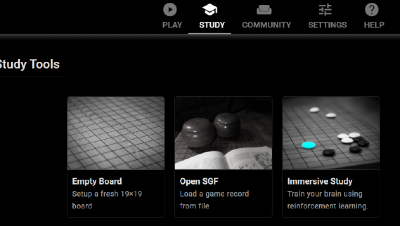
You simply start Immersive Study mode, and select either an empty board or upload an sgf file as source. If you upload a game, the system will automatically start analyzing it, and you can simply walk through the game with Sensai Go feedback system enabled. At any point you can play different moves/variations to also get feedback for those and compare different outcomes. The principle of Sensai Go is to not just give the best AI answer, but to help you learn to ask the right questions. Instead of learning things by heart, you constantly challenge and compare your own ideas, and try out new ones, and hopefully update your intuition about what makes a good move.
Basic instructions
This list is my personal recommendation of how to use the system to analyse your games. Feel free to make up your own method.
- Go through the game and observe the feedback. Take your time to take it all in and notice the turning points in the game.
- When you encounter any mistake, stop!
- Why was it a mistake? Find the punishment! (best opponent's move)
- What are better options? (Hint: They often prevent the punishment.)
- Always check tenuki/big moves to test the local urgency of moves
- Whenever you have any question or idea for a move, just go explore.
- Be careful to not get lost in variations, always come back to the real game. You'll not always find the best answer and that's fine, just remember the best ones you did find.
Game import
Now, you might have seen my analysis video of top pro's games, where I used CDF (cumulative distribution functions) to visualize player's move quality. If not, please feel free to check it out:
This feature already worked for games played on Sensai Go, but now it's available for all your games. Basically when you open an sgf file in immersive study mode, Sensai Go will analyse all moves in the background. Once this processing is finished, you have the option of importing the game and its move quality metrics.
Importing a game + metrics means the system treats these games as your personal games and will process your metrics as such. So you can upload your games from different Go servers and import them all to Sensai Go. Then all these metrics will be visible in your statistics, and you can see how your move quality distribution develops over time, and compare yourself with the greats of Go. The system is not used for rank calculations, just your personal move quality statistics. For now these are private, I might add an optional toggle to share them in the future.
Visual redesign
UI isn't necessarily my first priority, and I haven't been really happy with the provisional web interface of the page for a long time. Though I still think there's no reason a Go app shouldn't be good looking. For this update I got a bit obsessed and invested a good amount of time into a visual overhaul, and I think it's a nice upgrade. I tried to keep it simple and stick to a consistent theme, but added a bit of details here and there, I hope you appreciate the new look.
Security Hardening
Lately the software development world is under a lot of security pressure, e.g. frequent supply chain malware attacks on open source packages. It's a serious problem, exacerbated by the rise of AI. This project uses open source packages, of course, and even one of the ones that were compromised already. Luckily I never installed the malicious versions, so nothing happened. However it's a definite danger, and I've taken a number of steps to prevent such a thing from occurring. I checked all my packages for vulnerabilities, updated them to secure versions, and introduced counter measures to prevent any impact from future supply chain attacks. The app also got an overall security overhaul and many potential issues have been proactively mitigated.
Outlook
Honestly version 0.7 is the biggest update so far, and the first one that is actually pretty close to what I imagined when I first conceived of this idea. It's been a lot of years and many iterations since then and I'm really awed that somehow I managed to arrive at this point. Pretty cool. There are many things I still want to add and do but for the next months I'll focus on stabilization/hardening. I've not yet experienced Sensai Go working at scale (serving many users simultaneously), and I expect this to be a topic that comes into focus as more people come to use the platform.
I hope y'all have fun playing around with it, and let me know what is and what is not working, so we can make it the best place it can be. In the meanwhile I want to focus more on creating content for a while to hopefully - bit by bit - get a real crowd together.
Check out the latest video where I demonstrate all the new stuff:
Hope to see you soon on Sensai Go!